Advanced Data can only be used when the Analysis type is Simulation, General analysis or Double Deck General analysis.
Entering Passenger Data in Advanced mode allows you to enter separate destination probabilities for passengers travelling from each floor.
If the analysis type is Simulation, you can also define a number of periods each with their own set of arrival rates and destination probabilities. Each period has a start time, end time, loading times, passenger mass, etc. Periods may overlap in time. This allows Elevate to model changing levels of traffic, and to introduce refreshment trolleys, goods loads, etc. into the passenger traffic flow.
When you change from Standard to Advanced mode, Elevate gives you the option of filling the Advanced mode tables based on the data you have entered in Standard mode.
In Advanced mode, data is entered in a table. As in Building Data, this table operates like a Microsoft Excel spreadsheet; you can use formulae, speed fills, drag and drop, etc. to help with data entry.
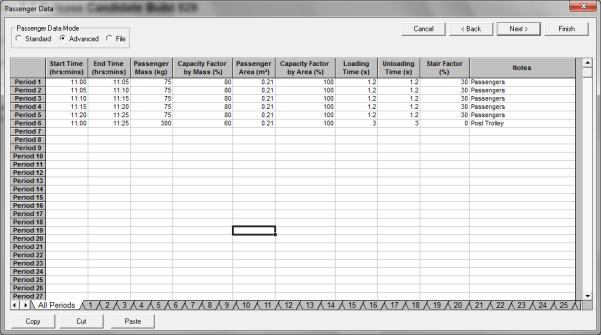
Click on the All Periods tab to select this page. Enter the Start Time, End Time, etc. (see preceding Standard mode section for definitions).
Was this article helpful?
That’s Great!
Thank you for your feedback
Sorry! We couldn't be helpful
Thank you for your feedback
Feedback sent
We appreciate your effort and will try to fix the article