Introduction
Elevate calculates car loading considering both Elevator Data — capacity (kg), platform area (m²) — and Passenger Data: passenger mass (kg), capacity factor by mass (%), passenger area (m²/person), capacity factor by area (%).
Why both mass and area?
Historically, car loading was based on the capacity of the car and the mass of passengers in kg (or lbs). However, this approach can be misleading as the available platform area per person typically decreases with increasing car size. See CIBSE Guide D 2020, section 3.7 and Table 3.11.
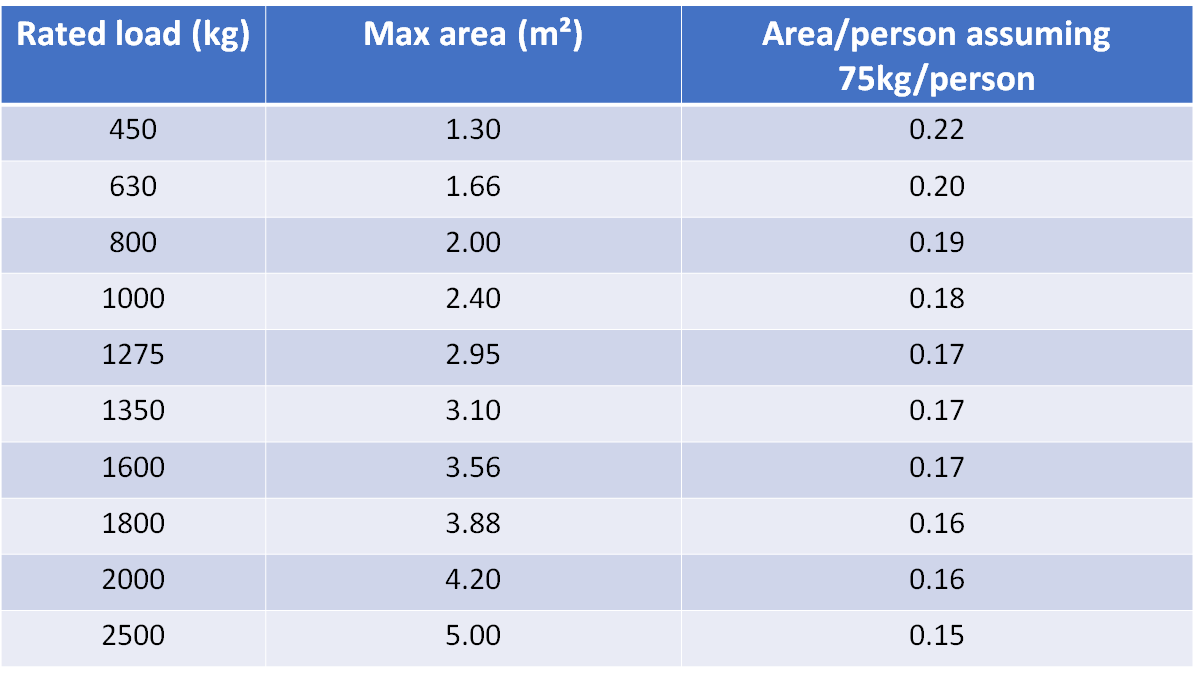
In practice, the platform area may be smaller than the allowed maximum. For example, in one office building traffic survey, a 1600 kg lift had a platform area of 2.92 m², compared to the maximum allowed of 3.56 m².
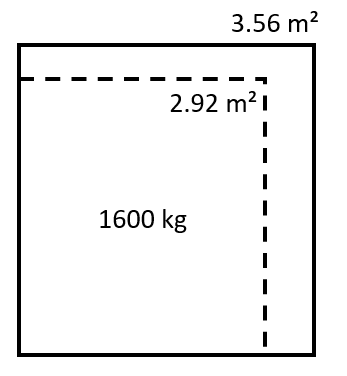
This lift had a nominal capacity of 1600 kg / 75 kg/person = 21.3 persons (rounded to 21).
If loading were based on area, using 0.21 m²/person, the maximum loading would be 2.92 / 0.21 = 13.9 persons. The observed maximum was 14 persons.
In reality, passengers judge available space visually. So to reflect real behaviour, calculations should include both mass and area.
Generally, we recommend using both mass and area. In smaller lifts, mass may be the limiting factor; in larger ones, area is usually limiting. If only mass is to be used, set the passenger area to 0 m²/person.
What values of passenger area and mass should I use?
Elevate uses default values of 75 kg and 0.21 m²/person. These are appropriate for European offices but should be adjusted for different building types or regions. For example:
- Hotels – increase area to account for luggage
- Residential – increase for shopping trolleys, prams, etc.
For more guidance, refer to CIBSE Guide D 2020, section 3.7.
What values should I use for capacity factor?
This depends on whether you are performing a calculation or a simulation.
For calculation

CIBSE Guide D states: “Due to the randomness of passenger arrivals, it has been shown (Barney et al., 1977) statistically that a satisfactory lift installation can be achieved if the average number of passengers in a car is 80% of the maximum passenger capacity. This is known as the capacity factor.”
Example: For a 16-person lift, use 80% = 12.8 passengers as the average for RTT calculations.
For simulation

In simulation, a passenger may load into the lift if the car does not exceed 100% by mass or area. This reflects occasional full loadings — typically during peak traffic.
To ensure the system is not regularly overloaded, CIBSE recommends checking the worst 5-minute capacity factor by area. These can be found in:
- Car Loading on Departure from Home Floor
- Car Loading on Arrival at Home Floor
For compliance with CIBSE Guide D, this value should not exceed 80%.
Consistency between calculation and simulation
Using 80% capacity factor in calculation and 100% in simulation is consistent if the average simulated car loading does not exceed 80%.
But my design guidance says to use 60% loading — what should I do?
This is a legacy approach. Simpler software often reduced capacity factor rather than increasing the assumed passenger mass or area. This method is still used in hotel brand standards and similar documents.
While this is acceptable, it can create inconsistencies. For more realistic modelling, it's better to adjust passenger mass and area rather than reduce the capacity factor.
Was this article helpful?
That’s Great!
Thank you for your feedback
Sorry! We couldn't be helpful
Thank you for your feedback
Feedback sent
We appreciate your effort and will try to fix the article