Elevate uses a speed reference generator to calculate flight times between floors, and to track the exact position of elevators during a simulation.
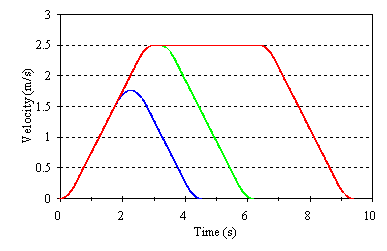
Example speed profiles
You can control this speed profile completely by entering your values for:
- Speed - in m/s
This can be specified to be an exact number or selected over a range. A list of standard speeds is used for the select option. To modify this list, click on the button marked “List”. The default speed list is based on CIBSE Guide D 2020 Table 3.8, with the addition of some lower and higher speeds. If the Auto (CIBSE Guide D 2020) option is used, Elevate applies Table 3.6 from CIBSE Guide D 2020 to consider a speed selection range including speeds which would be included in the classification range from Basic to Prestige. Table 3.6 includes a Building Type classification. If a classification is entered in Building Data, this will be applied; otherwise speeds allowed in the full selection range (nominal travel times ≥ 20 s and ≤ 40 s) will be considered.
- Acceleration - in m/s²
This can be selected automatically or specified as an exact value. If the Auto (high performance) option is used, Elevate uses the table below to select an acceleration appropriate to the elevator speed. If the Auto (CIBSE Guide D 2020) option is used, Elevate applies Table A2.2 from CIBSE Guide D 2020.
- Jerk - in m/s³
This can be selected automatically or specified as an exact value. If the Auto (high performance) option is used, Elevate uses the table below to select a jerk appropriate to the elevator speed. If the Auto (CIBSE Guide D 2020) option is used, Elevate applies Table A2.2 from CIBSE Guide D 2020.
Speed | Acceleration | Jerk |
|---|---|---|
0.30 | 0.4 | 0.8 |
0.63 | 0.4 | 0.8 |
1.00 | 0.4 | 0.8 |
1.60 | 0.7 | 1.4 |
2.50 | 0.8 | 1.6 |
3.15 | 1.0 | 1.6 |
5.00 | 1.2 | 1.6 |
6.00 | 1.5 | 1.6 |
7.00 | 1.5 | 1.6 |
8.00 | 1.5 | 1.6 |
Automatic acceleration and jerk selection for Metric units analysis (high performance)
Was this article helpful?
That’s Great!
Thank you for your feedback
Sorry! We couldn't be helpful
Thank you for your feedback
Feedback sent
We appreciate your effort and will try to fix the article