Stair Factor provides a quick and easy way to make an allowance for stair (or escalator) usage in your calculations.
If you enter a Stair Factor of x, Elevate assumes that x% of the passengers will walk when travelling one floor, (x% of x%) will walk when travelling two floors, and (x% of x% of x%) will walk when travelling three floors. For example, if you enter a Stair Factor of 40%, Elevate will assume the following split of passengers between the stairs and the elevators:
No of floors to be travelled | % passengers using stairs | % passengers using elevators |
1 | 40 | 60 |
2 | 16 | 84 |
3 | 6 | 94 |
4 | 3 | 97 |
5 | 1 | 99 |
6 | 0 | 100 |
Example division of stair and elevator usage for a stair factor of 40%
You should always use a Stair Factor of 0% if the building includes an express zone.
Alternatives to using Stair Factor
In most cases, Stair Factor is an effective way of making an allowance for stair usage. However, there are alternative approaches.
Adjusting the population
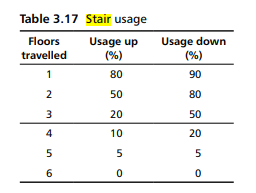
If you were doing an up peak calculation and wanted to apply Table 3.17 of CIBSE Guide D 2020
If the population is
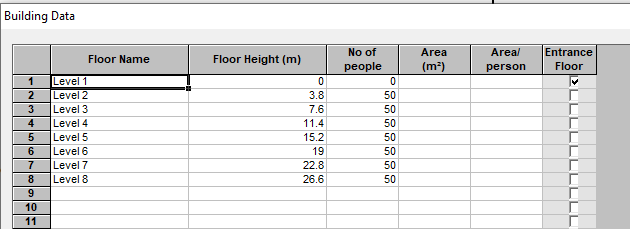
You could apply the "Usage up" column of the CIBSE Guide D table, adjusting the population, removing the people who are deemed to use the stairs as follows.
Make adjustments to an Advanced Passenger Data table
If you have a traffic demand
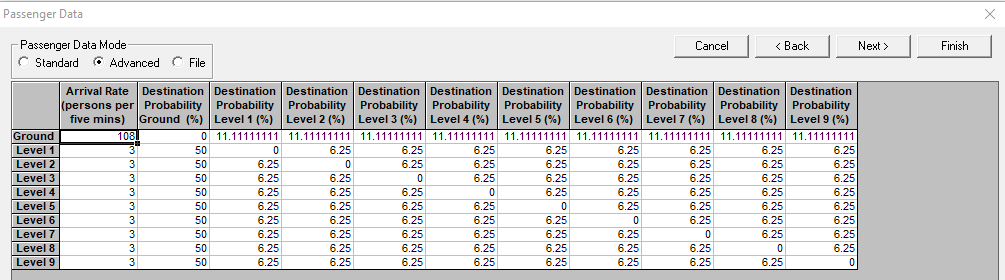
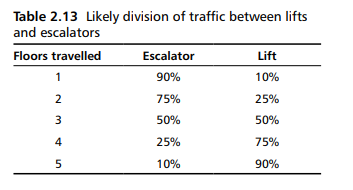
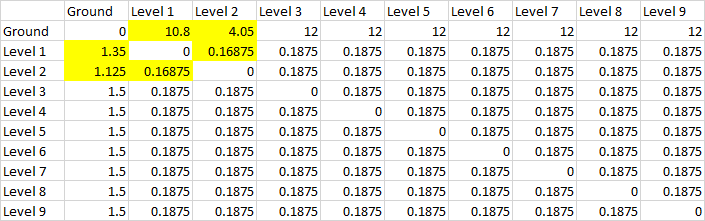
And wanted to allow for escalators between Ground and Level 1 and between Level 1 and Level 2, first convert the arrival rate/destination probability table to a from/to table using a spreadsheet. A from/to table provides the number of people travelling between each floor expressed in persons per five minutes.
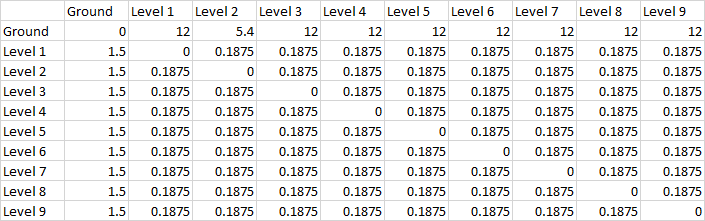
Then apply table 2.13 of CIBSE Guide D 2020
Yielding
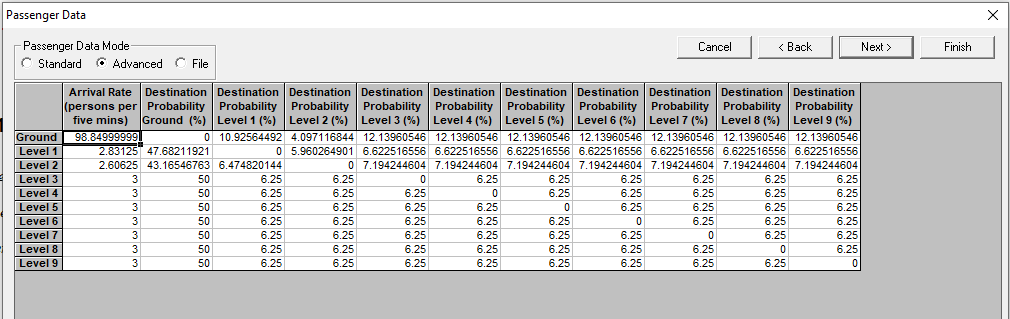
This can then be converted back into arrival rates and destination probabilities for entry in Elevate:
Was this article helpful?
That’s Great!
Thank you for your feedback
Sorry! We couldn't be helpful
Thank you for your feedback
Feedback sent
We appreciate your effort and will try to fix the article